GRID Spreadsheet Engine
Proven spreadsheet engine. Built to fit your stack.
You're probably here because you understand how complex spreadsheet logic is. The GRID engine solves that. It runs headlessly inside your application. Deploy it in the browser, on-device, in the cloud, or on your own servers, and surface it however your product needs. Compatible with Excel and Google Sheets, and designed to work naturally with AI systems through a structured interface that lets language models read, modify, and create spreadsheets directly, with no need to generate code.
Core capabilities
Animation-speed recalculation
The engine is optimised for extremely fast recalculation. Changes propagate through the dependency graph, computing the cells that need to recalculate. Even large or complex models recalculate at animation speed, keeping interactive UIs fluid and responsive as users change inputs.
Runs wherever your product runs
Deploy the engine in the browser, on the user's device, in the cloud, or on your own servers. It adapts to your architecture and runs close to your application, eliminating server round-trips for spreadsheet interactions and keeping data within your own infrastructure.
Compatible with Excel and Google Sheets
Existing spreadsheets run as-is. The engine is deeply compatible with both Excel and Google Sheets, covering the functions, operators, and edge cases that make real-world spreadsheets work correctly.
Structured interface for AI systems
Instead of requiring language models to generate and maintain code to interact with spreadsheets, GRID exposes a structured interface that lets AI systems read, modify, and create spreadsheets directly. This makes spreadsheet-driven AI workflows faster, more reliable, and easier to scale as complexity grows.

Fast and accurate recalculation
The engine maintains a dependency graph based on references in formulas. When a value changes, it traverses the graph and propagates updates only from cells whose value actually changes.
This means the engine never recalculates more than it needs to. Updates are fast, results are always correct, and behaviour is fully predictable regardless of how large or complex the model gets.
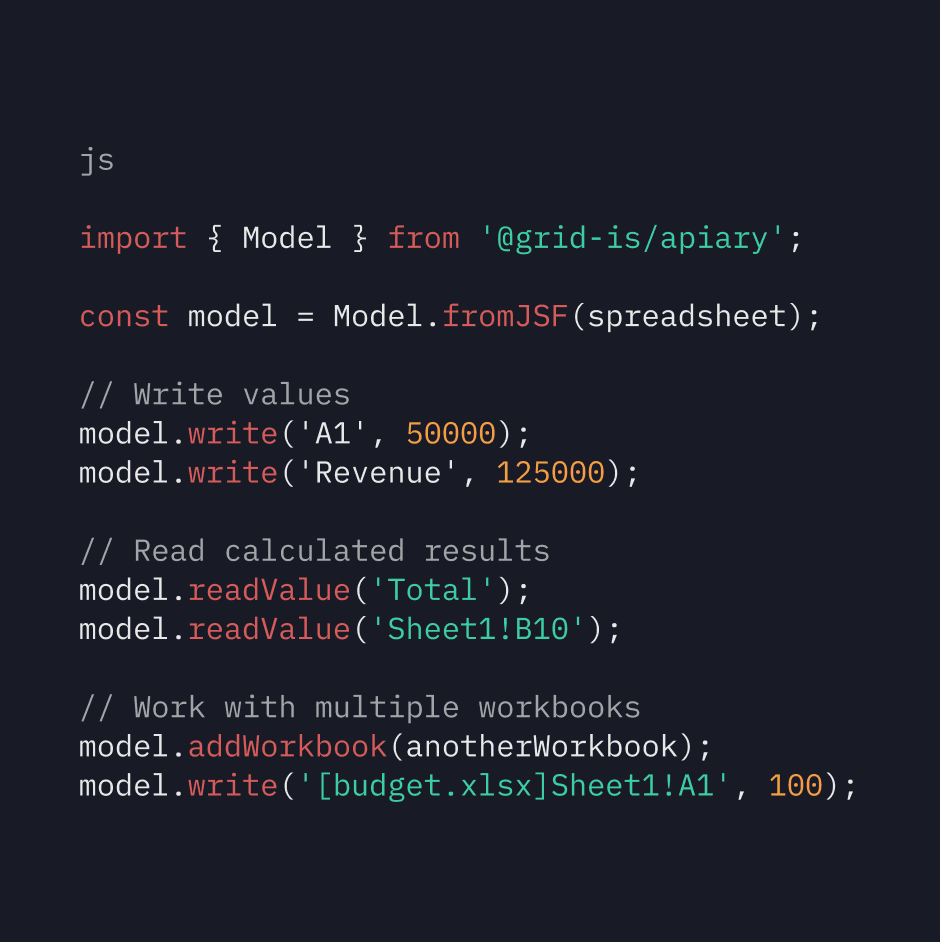
Apiary
Integrate with the TypeScript library
Apiary is the GRID engine packaged as a TypeScript library. A few lines of code is all it takes to load your spreadsheet model and start reading calculated values from it.
The library runs wherever your product runs. Deploy it in the browser for client-side spreadsheet logic, on-device for zero-latency interactions, in Node.js for server-side workflows, or in your own cloud infrastructure for full control over data privacy and performance. It adapts to your architecture rather than dictating it.
Reliability
200,000 automated unit tests
Every build of the GRID engine runs almost 200,000 automated unit tests. These cover a wide range of functions, operators, inputs, and edge cases, ensuring there is no drift in how the engine handles existing spreadsheet behaviour as it evolves.
Trusted by teams building with spreadsheets
GRID's engine is embedded as core spreadsheet infrastructure in products people depend on every day. Including a leading AI assistant that uses GRID to power their spreadsheet capabilities, and Calculator Studio, a product built entirely on top of the engine that delivers real-time interactive spreadsheet experiences.
How compatible is the engine with Excel and Google Sheets?
Does the engine modify my spreadsheet files?
Where does the engine run?
How does the engine work with AI systems?
How do I get started?
The hardest part of integrating spreadsheets is getting started. We’ve made that easy.
Most teams are surprised by how quickly they can go from first contact to a working integration, with direct support from the GRID team throughout.